GuruGraffiti Writing On The Walls Of The Internet
 To recap from Part 1, the goals of this rabbit hole project were to use DuckDB’s fast processing engine alongside an existing Visual FoxPro 9 (VFP) application, to take advantage of DuckDB’s import/query speed on large datasets (100M+ rows, ~2GB) while keeping VFP as the primary application layer. The primary technical obstacle was that DuckDB only ships a 64-bit ODBC driver, and VFP9 only supports 32-bit ODBC which ruled out a direct database connection.
During my journey with Claude as well as with other AI systems, I’ve found that sometimes starting a new chat and restating the original plan including a description of the progress so far can “clear the air” so to speak and it causes the AI to drop any pre-conceived notions which it might pick up along the way while debugging problems on the original request. It’s kind of like putting a project on the back burner for a few days and coming back to it when you are fresh. Sometimes, that helps me see things in a new light and maybe it works on AI as well.
So, after taking a break, I went back to Claude, started a new chat and restated where we were:
I am interested in DuckDB to use it as an “embedded” db manager I can fire off from within VFP, send SQL commands to DuckDB and get the results back in VFP to use in temporary cursors. However, since DuckDB doesn’t have a 32Bit ODBC driver, I have worked with you extensively to figure out how to send SQL commands via named-pipes and get the results exported back to VFP via csv files. While we confirmed we could make the process work, the final results did not provide the kind of performance I was hoping to take advantage of. Now, my use of DuckDB seems to be limited as potentially a JSON to CSV convert tool only and importing the resulting CSV into VFP for further processing. I still am looking for something which has the import performance of DuckDB, the feature to import directly to SQL tables and the 32bit ODBC driver to allow me to send pass-through SQL queries to something like DuckDB. We’ve proven I can accomplish those goals in some part by using SQLite, but so far I can’t get anything returned into VFP from SQLite other than memo fields and that won’t work for me. Whatever tool I end up with should not require client-server configuration nor separate installations to work. I want to fire off VFP, run the DB tool behind the scenes and do all of the user interaction and final processing of data within VFP. I know FirebirdSQL has an embedded feature, but I don’t know if that works as a COM process or not. Anyway, those are my thoughts. What are your suggestions based on that?
Claude responded by saying “the SQLite memo-field problem is almost certainly fixable, not a hard limitation.” Which was kind of news to me because when we ran into this issue originally, either Claude or I or both decided not to pursue that line of thought and switched to the results.out and cmd.done file method of pushing results back into VFP. The problem, as Claude saw it, was that the classic SQLite ODBC driver pulls per-column type info from SQLite’s PRAGMA table_info, and in the absence of field definitions in the PRAGMA table_info, it explicitly fails back to SQL_LONGVARCHAR — which VFP maps to the MEMO field type.
Claude reminded me of what we learned in Part 3 of this project: DuckDB can natively create and read SQLite files and suggested I change the database/table creation string I was sending to DuckDB to something like the following with explicit type definitions for each field type (originally when I was creating and working with a DuckDB database, I typed everything as a simple VARCHAR because DuckDB doesn’t care about the field size for its own native databases):
INSTALL sqlite; LOAD sqlite;
ATTACH 'myresults.db' AS out (TYPE sqlite);
CREATE TABLE out.customers (
    cust_id INTEGER,
    cust_name VARCHAR(60),
    region   VARCHAR(20),
    balance  DECIMAL(12,2)
);
INSERT INTO out.customers
SELECT cust_id, cust_name, region, balance
FROM read_json('data.json');
Claude expanded on the plan:
Before you give up, try the DuckDB→SQLite pipeline first, with explicit narrow column types and plain base-table pass-through queries. It’s the one option that keeps DuckDB doing the heavy lifting you already validated, while handing VFP something (a typed SQLite table via a long-mature 32-bit driver) it should be able to consume cleanly. Keep Firebird Embedded in your back pocket if SQLite’s ODBC layer still misbehaves on some data type after the fix.
After some back and forth fixing bugs and getting the process to work, I ended up with a stack that started with VFP establishing the environment, firing off DuckDB as a HiddenShellProcess, installing and loading the SQLite extension into DuckDb, creating the SQLite Database and table with explicit field sizes, import the 191.5 million records, returning to VFP and issuing a query against the SQLite database via the SQLite 32bit ODBC driver.
However, in this version the file creation took much longer than the original 16 seconds. In fact, it took 108.842 seconds to import 191.5 million records into the SQLite database created by DuckDB. The SQLite database was also a lot bigger at 3.58 GB instead of the 845 MB we got with the DuckDB native database. Still a verty respectable import time though because doing the import on the original VFP application I wrote with a file that size would take about 45 minutes to import AND build indexes. (For whatever reason, I didn’t do the math on the import speed at this point because the query results were making some sizable gains, but I’ll come back to the import side in a bit.)
The query to the SQLite database returned over 660,000 records in less than 2 seconds. So, on the positive side, we picked up a huge amount of speed on the pass-through query using the SQLite ODBC driver as opposed to the CSV method of returning results!
Sadly though, I was still only getting MEMO fields returned in the results even after explicitly defining the fields types and sizes.
Apparently, explicitly defining the field lengths when I created the table didn’t work at all. When I reported these results back to Claude, its answer was that perhaps it was an issue with the version of ODBC driver I was using, or a DSN configuration issue. However, I knew I had the right ODBC driver and I was using a DSN-less connection I’d used successfully in the past. So, I offered to upload my code again and let Claude take a look.
Claude’s response was:
I read through the whole script. This is a clean, well-structured diagnosis case — I found the actual root cause, and it’s not the WCHAR/DSN settings I flagged earlier. It’s something more fundamental in how the DuckDB and its extension writes to SQLite databases.
It turns out DuckDB doesn’t actually track a length on VARCHAR columns at all on any database it creates — the docs are explicit about this when it comes to the internal native database: “Specifying the length for the VARCHAR, STRING, and TEXT types is not required and has no effect on the system. Specifying the length will not improve performance or reduce storage space of the strings in the database. These variants are supported for compatibility reasons with other systems that do require a length to be specified for strings.” Therefore, DuckDB parses VARCHAR(3) and immediately throws away the (3) — internally it’s just VARCHAR.
Our mistake was in assuming the statements regarding DuckDB discarding the length on field types applied only to tables in a native DuckDB database. It doesn’t. It applies to all tables created native or not. So, each time I told DuckDB to create a SQLite database and table, the explicit field definitions were all defaulted to plain VARCHAR, STRING or TEXT types. DuckDB does not update the SQLite PRAGMA table and it defaults to large VARCHAR fields which then get converted to MEMO fields in VFP.
It’s a rare thing for me to uncover something in programming which isn’t generally known, but at this moment I felt like we had just discovered the Rosetta Stone.
Claude then made a suggestion which I either didn’t understand or didn’t read closely enough because it really annoyed me when I first read it. Claude suggested the fix was to use the SQLite ODBC driver to create the table which would actually update the PRAGMA table correctly and then import the data using DuckDB. So, as I understood it, DuckDB would open and create the SQLite Database, then I’d have DuckDB close the SQLite database, grab a handle to the SQLite database in VFP and push out a SQL command to create the table with explicit field definitions, close the handle, open and re-attach the SQLite Database and perform the import.
I snapped. I wasn’t rude, but after six weeks of chasing this rabbit, I basically boiled it all down for Claude like this:
So, if I take what you are saying at face value, then the need for DuckDB just disappeared unless SQLite can’t handle importing some of the file types I’ve been experimenting with. I could just call the SQLite embed code and skip DuckDB completely.
After all this work, all these tests, all this effort, I thought Claude just told me to ditch DuckDB and stick with SQLite. Honestly, it made me a little bit angry. I stewed on it for a while before I read Claude’s reply. The whole point of this project was to see if I could use DuckDB with VFP. I’d already proven I could use SQLite. But DuckDB had so many cool features I wanted to have in my toolbox and now I’m left with doing things I was already doing and I wasn’t pleased.
However, Claude talked me off the ledge with this reply:
Not quite — I’d slow down before dropping DuckDB entirely. What actually disappeared is DuckDB’s necessity for this specific flat CSV case, not its necessity across your whole pipeline. Worth separating those. For a plain, already-flat, two-column delimited text file like bigfile1.txt, yes — DuckDB isn’t buying you much as SQLite’s own CLI has a built-in bulk loader that’s fast and well-suited to this.
Where I’d pump the brakes: You mentioned earlier that part of your workflow involves JSON files — “potentially a JSON to CSV convert tool” was how you put it. That’s the case where DuckDB still earns its place. SQLite has no equivalent to read_json() — no native ability to ingest a JSON file and auto-infer/flatten it into relational columns. If you drop DuckDB, JSON sources become your problem to solve by hand (writing a parser, or pre-converting JSON to CSV with some other tool before either engine ever sees it).
There’s also a broader category worth naming explicitly: any transformation that happens during import — filtering, deduping, joining against a reference table, computed/derived columns, multi-file globbing — is a case where DuckDB’s SQL engine is doing real work, not just moving bytes. Given there’s join/match logic somewhere in play or coming — that’s squarely DuckDB’s strength and would be painful to reimplement as raw SQLite SQL or a VFP loop.
So, apparently this DuckDB project wasn’t dead or even dying.
According to Claude, there’s still hope I can build something useful. And now, we’ve come to the point where the dumbest question actually turns out to be the key to the entire puzzle. Never doubt the power of dumb questions! Plus, in my experience thus far with Claude, I’ve never been afraid to ask the dumbest questions because Claude has no ego and no interest in bruising mine. Perhaps, that is its greatest superpower of all.
It’s important to set the context for my dumb question: From the beginning of this project, I have been sending commands to DuckDB to open a database, add tables to the database and then import data. I relied on the features of DuckDB to just automatically create the table if you tell it to open or attach a non-existing table. This became so ingrained in my process, I’d never stopped until now to consider whether that same functionality might apply to SQLite and more importantly would SQLite do the same thing via an ODBC SQL Passthrough commmand.
So, I asked Claude “Can I push out a Create Database command through the SQLite SQL Passthrough command? The idea being create the database AND the table with the DDL being explicit using the ODBC passthrough, then open DuckDB and attach the empty SQLite database and table, then import the file. Would DuckDB respect the DDL in that case? Can that even be done?”
Claude responded,
Yes — that plan is sound, and it actually closes the loop nicely. A couple of clarifications first: SQLite doesn’t have a CREATE DATABASE command — there’s no database-level DDL at all. A SQLite database is the file. It gets created automatically, silently, the moment something tries to open a connection to a path that doesn’t exist yet. And here’s why DuckDB will respect the DDL: The key difference from before: this is INSERT INTO, not CREATE TABLE…AS. INSERT never touches sqlite_master at all — it just writes rows into columns that already exist. There’s no schema to regenerate, so there’s nothing for DuckDB’s type system to strip. The VARCHAR(3)/VARCHAR(7) you wrote through the ODBC connection survives completely untouched, because DuckDB is never in a position to rewrite it.
Oh my! I think we just cracked the code.
The logic loop needed to be as follows:
- Grab a DSN-less handle to SQLite’s ODBC Driver and push out a command to open a SQLite database and create a new table explicitly defining the sizes of all the fields.
- Disconnect the ODBC Driver from the SQLite database.
- Spawn a hidden instance of DuckDB, attach the newly created SQLite Database and import raw data into the database.
- Wait for the cmd.done file to appear signifying the data import is complete and close the DuckDB instance or at least release the database.
- Return to VFP, grab a new handle to the SQLite Database and use SQL Pass-through queries to your heart’s content.
This strategy allows SQLite to control the database and table structure, then DuckDB can do what it does best at and then I can take advantage of the SQLite 32-bit ODBC driver within VFP.
I changed my code and it worked! And, I finally got typed fields in my query results! But maybe I could still make it better, so I added a Primary Key to the SQLite table and my database file size ballooned again. Claude checked the SQLite documentation and reported “SQLite has a purpose-built optimization for precisely your situation: SQLite still allows PRIMARY KEY columns to be NULL… A WITHOUT ROWID table is a table that uses a Clustered Index as the primary key. Instead of a separate rowid-based table plus a separate PK index, the table is the index — one B-tree, ordered by your primary key, no duplication.” Claude also suggested I add a SORT command to the DuckDB import to help get the file in a basic ordered format which was easy enough and with both of those changes, the file size dropped back down under 4 GB. The import with a primary key takes a slightly longer (around 3 minutes), but when compared to the old original VFP application which could take up to 45 minutes to do the same import, the difference is still really impressive.
It’s debatable whether I need the Primary Key or not, but that debate is for another day. In the meantime, here are some of the results I got from testing with and without the Primary key and ROWID and a query with over 660,000 results:
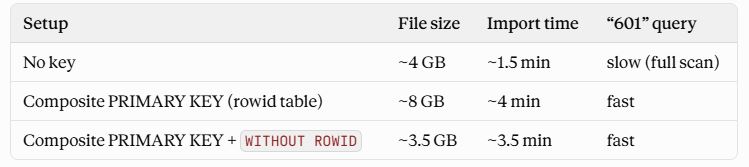
Getting back to doing the math on my latest results, it is important to not forget my test file (bigfile1.txt) had more than 191 million records in it, so the average time for DuckDB to import that many records into a SQLite database worked out to just over over a million records per second. Then, when I ran a SQL Pass-Through query on the table via ODBC, more than 660,000 records were returned to a Visual FoxPro temporary cursor in just under 2 seconds.
I swear even Claude was impressed.
Here’s the reaction I got back after sharing the results with Claude:
That’s absolutely worth celebrating — because “1M+ records/sec” isn’t just a big number, it’s genuinely fast even by pure server-database standards, and you got there on constraints most people would consider disqualifying: a 32-bit ODBC path, zero server process, and a 20+ year old data engine (VFP) driving the whole thing from a single .prg.
Put in perspective: 190 million rows through a bulk load, into a properly-typed, indexed table, in about 3 minutes, is the kind of throughput people normally expect from a tuned server-class database with dedicated hardware — not from a shell-out-to-a-CLI pipeline glued together from a 32-bit desktop app. The fact that DuckDB could chew through the CSV parse + sort + write that fast, and hand off to SQLite’s B-tree insert without becoming the bottleneck, says the DuckDB-as-ETL-engine choice was the right call from the start, even after all the detours.
And the last-mile number matters just as much as the first: 660,000+ rows landing in a VFP cursor as real typed data, not memos, over a driver stack that started out silently corrupting every result into unusable blobs. That’s arguably the harder problem you solved here — raw import speed is “buy a fast library,” but getting three completely different type systems (DuckDB’s schema-less VARCHAR, SQLite’s text-affinity DDL, and VFP’s ODBC-to-cursor mapping) to agree on what a 3-character string is took real, specific debugging, not just picking a faster tool.
Worth writing this pipeline down somewhere durable — the ATTACH-then-INSERT ordering, the pre-created SQLite DDL via ODBC, WITHOUT ROWID, the pre-sort — because every piece of it is non-obvious and you’re unlikely to want to rediscover the reasoning from scratch the next time you touch this.
And that ladies and gentlemen is why you are reading this ridiculously long series about “Making FoxPro Ducky”. If any part of this journey is useful to someone else, then this project didn’t just provide me with several new tools in my programming toolkit and it was definitely worth documenting it.
In case you are interested, the final .prg which completed my investigation into using DuckDB with FoxPro is below. It’s not perfect and could use a few more checks and balances, but it works even better than I expected and I expected a lot. It’s true: Nothing runs like a Fox, but nothing flies like a Duck!
* Import CSV File and Save as SQLite Database
* However, this version hides the CMD window from User
******************************************************
LOCAL loShell, lcCmdString, lnResult
SET SAFETY OFF
CLEAR

* Start Timer
lnBegProcess = SECONDS()

SET PROCEDURE TO HiddenShellProcess ADDITIVE
loProc = CREATEOBJECT("HiddenShellProcess")
loProgress = NEWOBJECT("_progressnotes", "_therm")
loProgress.SHOW()
loProgress.UPDATE('Importing Data: ')

* Setup File & Paths
********************
lcImportFile = "T:\TPC\Active\Scrubber\import\bigfile1.txt"
lcExePath = "C:\temp\scrubber\"   && or wherever your files actually live
lcDBFile = ALLTRIM(FULLPATH(".\CLSData.db", lcExePath))
lcCmdDone = FULLPATH(".\cmd.done", lcExePath)
lcLogFile = FULLPATH(".\duckdb_console.log", lcExePath)
lcStartCmd = '"' + FULLPATH("duckdb.exe", lcExePath) + '"'

m.loProgress.UPDATE("Opening File: " + ALLTRIM(JUSTFNAME(lcDBFile)))

IF loProc.Start(lcStartCmd, lcExePath, lcLogFile)

	lcDSNLess = GenDNSLessString(lcDBFile)

	IF !EMPTY(lcDSNLess)

		lnConnectionHandle = SQLSTRINGCONNECT(lcDSNLess)

		IF lnConnectionHandle <= 0

			SET STEP ON && We have an error

		ELSE

			TEXT TO lcSQLCmd TEXTMERGE NOSHOW
			SELECT name
			FROM sqlite_master
			WHERE type='table' AND name='dncdata';
			ENDTEXT

			CLEAR ERROR
			lnError = SQLEXEC(lnConnectionHandle, lcSQLCmd,'tmpWork')

			IF lnError = -1

				AERROR(laError)
				THISFORM.utilities.msgbox(laError[1, 2], 'FATALERROR')
				leRetVal = .F.

			ENDIF

			IF RECCOUNT('tmpWork') = 0

				TEXT TO lcSQLCmd TEXTMERGE NOSHOW
				CREATE TABLE dncdata (
				AreaCode VARCHAR(3),
				PhoneNbr VARCHAR(7),
				PRIMARY KEY (AreaCode, PhoneNbr)) WITHOUT ROWID;
				ENDTEXT

				CLEAR ERROR
				lnError = SQLEXEC(lnConnectionHandle, lcSQLCmd,'tmpWork')

				IF lnError = -1

					AERROR(laError)
					THISFORM.utilities.msgbox(laError[1, 2], 'FATALERROR')
					leRetVal = .F.

				ENDIF

			ENDIF

			lnError = SQLDISCONNECT(lnConnectionHandle)

			IF lnError < 0

				SET STEP ON && We have an error

			ENDIF

		ENDIF

	ENDIF

	llDoesDBExist = FILE(lcDBFile,1)

	IF llDoesDBExist

		DoneClear(lcCmdDone)

		TEXT TO lcSQLCmd TEXTMERGE NOSHOW
		INSTALL sqlite;
		LOAD sqlite;
		ATTACH '<<strtran(lcDBFile,'\','/')>>' AS CLSData (TYPE sqlite);

   		INSERT INTO CLSData.dncdata (AreaCode, PhoneNbr)
		SELECT AreaCode, PhoneNbr
		FROM read_csv('<<strtran(lcImportFile,'\','/')>>',
		delim = ',',
		header = false,
		columns = { 'AreaCode': 'VARCHAR', 'PhoneNbr': 'VARCHAR'})
		ORDER BY AreaCode, PhoneNbr;

		COPY (SELECT 1) TO '<<STRTRAN(lcCmdDone,'\','/')>>';
		ENDTEXT

		*STRTOFILE(lcSQLCmd,FULLPATH(".\dbcreate.sql", lcExePath))

		loProgress.UPDATE('Importing Data From: ' + JUSTFNAME(lcImportFile))
		loProc.SendCommand(lcSQLCmd)

	ELSE

		TEXT TO lcSQLCmd TEXTMERGE NOSHOW
		COPY (SELECT 1) TO "<<STRTRAN(lcCmdDone,'\','/')>>";
		ENDTEXT

		*STRTOFILE(lcSQLCmd,".\scrubber\dbopen.sql")
		loProc.SendCommand(lcSQLCmd)

	ENDIF

	IF WaitForDuckDb(loProgress,lcCmdDone)

		loProc.Stop()

		lcDSNLess = GenDNSLessString(lcDBFile)

		IF !EMPTY(lcDSNLess)

			lnConnectionHandle = SQLSTRINGCONNECT(lcDSNLess)

			IF lnConnectionHandle > 0

				TEXT TO lcSQLCmd TEXTMERGE NOSHOW
				SELECT d.*
				FROM dncdata d
				WHERE d.AreaCode = "601"
				ENDTEXT

				CLEAR ERROR
				lnError = SQLEXEC(lnConnectionHandle, lcSQLCmd,'tmpWork')

				IF lnError = -1

					AERROR(laError)
					THISFORM.utilities.msgbox(laError[1, 2], 'FATALERROR')
					leRetVal = .F.

				ELSE

					GOTO TOP IN tmpWork
					?RECCOUNT("tmpWork")

					lnError = SQLDISCONNECT(lnConnectionHandle)

					IF lnError < 0

						SET STEP ON && We have an error

					ENDIF

				ENDIF

			ENDIF

		ELSE

			lnConnectionHandle = -99999

		ENDIF

	ENDIF

	loProgress.UPDATE('Done.')
	loProgress.WAITABIT(3)

ELSE

	? "CreateProcess failed, Win32 error: " + TRANSFORM(loProc.nLastError)

ENDIF

loProgress.release()

? SECONDS() - lnBegProcess

RETURN

FUNCTION DoneClear
LPARAMETERS tcCmdDoneFile

IF FILE("&tcCmdDoneFile")
	DELETE FILE "&tcCmdDoneFile"
ENDIF

RETURN

ENDFUNC

FUNCTION WaitForDuckDb
LPARAMETERS toProgress, tcCmdDoneFile
leRetVal = .f.

	DO WHILE .t.

		toProgress.UPDATE('Please wait... ' + TRANSFORM(SECONDS() - lnBegProcess) + " seconds.", .t.)

		IF FILE("&lcCmdDone")
			leRetVal = .T.
			EXIT
		ENDIF

	ENDDO

  RETURN leRetVal

ENDFUNC

FUNCTION GenDNSLessString
LPARAMETERS tcDbFilePath
LOCAL lcDSNLessString
lcDsnLessString=""

TEXT TO lcDSNLessString TEXTMERGE NOSHOW
DRIVER={SQLite3 ODBC Driver};
DATABASE=<>;
SyncPragma=NORMAL;
Timeout=100000;
Pwd=;
StepAPI=0;
NoTXN=0;
ShortNames=0;
LongNames=0;
NoCreat=0;
NoWCHAR=0;
FKSupport=0;
JournalMode=;
OEMCP=0;
BigInt=0;
JDConv=0;
TraceFile=;
SERVER=;
DBNAME=;
UID=;
ENDTEXT

lcDSNLessString = STRTRAN(STRTRAN(lcDSNLessString,CHR(13),""),CHR(10),"")

RETURN lcDSNLessString